AI-guided real estate photography

Capture Every Room Like a Real Estate Professional

AngleSure guides you through the entire property, coaches every shot in real time, and professionally edits your images into polished, listing-ready photography.

AngleSure is available for iPhone on the App Store.

Try your first complete listing with guided capture and AI Shot Coach. Review protected results before subscribing; a plan unlocks processing, downloads, delivery, and future shoots.

Bright high-end home exterior staged for a real estate listing
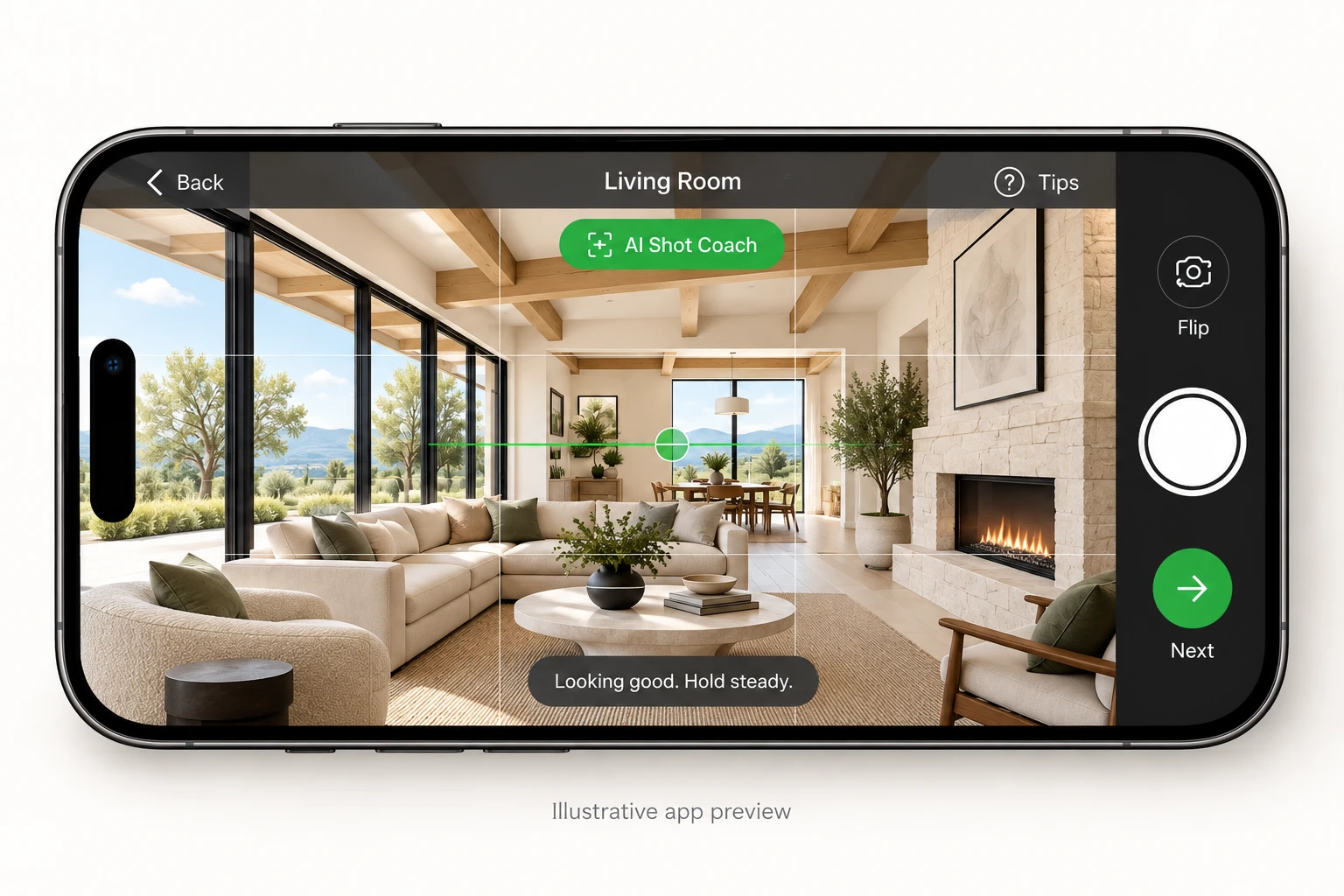
LIVE SHOT COACHLiving Room
Living room capture preview with full-room visibility
Ready to captureLevel lines, balanced framing, full-room coverage
Show the windows, seating area, fireplace, and room depth.
Perspective alignedComposition approvedRoom 7 of 15
Guided property workflowReal-time composition coachingProfessional photo editingMLS-ready listing presentation

Why AngleSure is different

A Better Edit Starts With a Better Photograph

Most real estate photo apps only improve an image after it has already been taken. AngleSure helps users capture the right image before editing begins by coaching angle, level, room coverage, framing, and camera position in real time.

Without guidance

Editing cannot fully repair the wrong starting image.

  • Poor angle and awkward camera position
  • Incomplete room coverage
  • Tilted verticals and unstable framing
  • Important architectural features missed
With AngleSure

Capture starts on a stronger professional foundation.

  • Balanced composition and better room visibility
  • Straighter lines and more natural perspective
  • Room-specific guidance on where to stand and what to show
  • Live coaching with a manual capture fallback
After editing

Finish with a cleaner, more consistent listing photo set.

  • Professional exposure and color work
  • Consistency across rooms and properties
  • Polished delivery for MLS and marketing use
  • Built to improve listing presentation

A coach, not a roadblock

Designed for the rooms you actually walk into.

Keep the standards that matter, with practical guidance for different iPhone lenses and real properties. Darker-room and tall-exterior improvements are included in 1.0.7, currently awaiting App Store approval.

Guidance for the camera you have

Field-of-view-aware analysis uses active camera and lens information when available. Tighter but intentional compositions do not need to mimic an ultra-wide image.

See both sides of the room

Follow diagonal corner-to-corner guidance for living rooms and kitchens, including bedroom reverse angles from the headboard corner toward the doorway.

Keep moving when approval stalls

Manual capture fallback lets you continue after repeated unsuccessful composition attempts. Repeated technical analysis failures also have a manual escape, so you can review the image and move on.

Built for real-world lighting

The 1.0.7 update adds darker-room tolerance when lighting cannot be controlled, while still checking for usable scene detail and rejecting unusable darkness or blur.

City buildings need room to rise

The 1.0.7 update accommodates necessary upward camera tilt for tall exterior buildings. This is exterior-specific guidance, not a relaxation of interior level and vertical checks.

Room-specific, shot-specific coaching

Entries, hallways, bedrooms, bathrooms, kitchens, backyards and special features each have guidance on where to stand, where to aim and what to include.

Complete property journey

One Guided Workflow for the Entire Property

AngleSure helps users understand which rooms need to be photographed, which angles are appropriate, how many images may be needed, where to stand, how high to hold the camera, how to keep lines level, and when a shot meets AngleSure’s standards.

Front exteriorEntryLiving roomKitchenDining areaPrimary bedroomAdditional bedroomsPrimary bathroomOther bathroomsHallway / Bonus spaceLaundry / UtilityClosetSpecial featuresBackyardRear exteriorViews and amenities

Planning your coverage? Remember the garage and, for apartments, condos and townhomes, any balcony / terrace. These are special-feature coverage considerations, not dedicated automatic room templates in this release.

Built on real estate photography standards

Professional Composition, Built Into Every Shot

AngleSure translates real estate photography principles into simpler, real-time coaching based on research into room-specific framing, camera position, perspective, balance, level lines, visual flow, and the types of listing images designed to attract buyer attention.

Straight, natural lines

AngleSure helps users keep horizons level and vertical lines more natural so rooms look stable, professional, and easier to understand.

The right camera position

Guidance helps avoid angles that are too high, too low, too close, or too far back for the space being photographed.

Balanced room composition

Framing guidance is designed to show layout, depth, windows, features, and the visual flow a buyer wants to understand.

Complete property coverage

The guided workflow moves from the front exterior through the key rooms and finishes with outdoor spaces, rear exterior, and notable features.

Consistent listing presentation

A structured capture process helps teams produce a cleaner, more cohesive set of listing photos across properties and users.

Buyer-focused framing

Shot recommendations are built to highlight space, function, light, and selling features that support stronger listing presentation.

Three-part product system

Everything You Need to Photograph a Listing

AngleSure is an AI-powered real estate photography coach, guided capture system, and professional photo-editing platform in one app.

01

Guided Property Shoot

Create a room-by-room plan for the property so the shoot starts with structure, not guesswork.

02

Real-Time Shot Coaching

AngleSure evaluates framing, level, position, stability, balance, and composition before capture.

03

Professional Photo Editing

Selected images move through AngleSure’s backend image-processing workflow for exposure, color, clarity, consistency, perspective, and listing presentation.

How it works

Guided from planning through final delivery.

The workflow is designed to help users capture a more complete, better composed listing photo set before professional editing and delivery.

Step 1

Create the Listing

Enter the property details, choose the type of shoot, and start with a structured plan for the home.

Step 2

Follow the Guided Shot List

AngleSure leads the user through the exterior, key rooms, features, backyard, and rear exterior so important coverage is not missed.

Step 3

Get Coaching. Keep Capturing.

Follow composition coaching for framing, level and room depth. If repeated attempts do not receive approval, use manual capture and continue your shoot.

Step 4

Receive Professionally Edited Photos

AngleSure processes the selected images into polished, listing-ready photography intended to support MLS and marketing use.

Who it is for

Built for real estate teams that need better listing coverage.

AngleSure is not positioned as a universal replacement for professional real estate photographers. It is a practical capture and consistency tool for situations where guided mobile workflow, training, or repeatable coverage matters.

For Agents

A better way to capture listings when hiring a photographer is not practical, or when an agent needs speed and consistency.

For Teams and Brokerages

A training and consistency tool that helps multiple users follow a more repeatable room-by-room workflow.

For Property Managers and Hosts

Useful for rental, leasing, and short-term property teams that need clearer listing presentation across units and properties.

For Builders and Developers

Helps present model homes, inventory, and completed spaces with a more structured approach to capture and final delivery.

For Media Companies

A guided mobile capture workflow that can support overflow work, internal QA, or more consistent room coverage standards.

For New Photographers

A practical coaching tool for learning real estate composition, room flow, camera position, and listing-focused framing.

Professional camera vision

Planned support for professional camera workflows.

AngleSure’s vision extends beyond phone photography. Planned professional camera support would allow a phone mounted to the camera’s hot shoe to evaluate live composition, then trigger a compatible camera’s shutter through a supported wireless connection.

In development. Canon integration is experimental and disabled in production.

Professional photography assistant in your pocket
  • Phone-based guided capture today
  • Team consistency and training support
  • Planned companion workflow for supported cameras

Export & delivery

The right file for the next destination.

Work from your finished photos. Save them to your phone, share individual images, or receive branded email delivery. Check your MLS’s own image requirements before uploading.

MLS Ready

A convenient listing-photo export for your everyday delivery workflow.

Full Resolution

Export the available processed image at full resolution for your marketing workflow.

Custom Resolution

Choose 2000 px, 3000 px or 4000 px long edge, or enter custom width and height. Use aspect-ratio lock, Fit, or Crop to Fill. Requested dimensions must fit within your processed source; no upscaling.

Exporting already processed photos does not deduct additional MLS-ready photos. Custom Resolution is an export option, not another processing purchase.

Pro Agent Annual · Awaiting App Store approval

A year of guided listings. Less than paying monthly.

100 MLS-ready photos per monthly allowance period. Unlimited guided capture and AI Shot Coach.

12 monthly payments $959.88

$799.99/year

SAVE $159.89

Approximately $66.67/month, billed annually. One year paid upfront; renews annually unless canceled. USD.

Explore Annual Savings

Trust and resources

Built specifically for real estate photography.

Created around room-by-room property coverage, guided from capture through final delivery, and designed to make professional standards easier to follow without pretending editing alone can rescue the wrong shot.

Built for listing presentation

Designed to help listings stand out, attract more buyer attention, and give the home a better opportunity to be presented professionally.

Need pricing details?

Review subscription plans, additional MLS-ready photos, and billing guidance for agents, teams, and brokerages.

View Pricing

Need help with your next shoot?

Questions about capture workflow, account setup, your photo balance, or support policies can be handled directly by the AngleSure team.

Visit Support

What is AngleSure?

AngleSure is an AI-powered real estate photography system that guides property capture, coaches photo composition, and professionally edits listing images.

Does AngleSure only edit photos?

No. AngleSure helps before, during, and after the shoot. It guides the user through the property, recommends the necessary photos, coaches composition, and professionally processes the final images.

Can AngleSure help me photograph every room?

Yes. AngleSure is designed around a structured property workflow covering the exterior, interior rooms, key features, backyard, and rear exterior.

Does AngleSure guarantee that a home will sell faster?

No. Many factors affect a property sale. AngleSure is designed to improve listing presentation, support stronger buyer attention, and give agents and sellers a better opportunity to present the home professionally.

Is AngleSure for professional photographers?

AngleSure can support agents, teams, property professionals, new photographers, and experienced photographers who want a more consistent guided workflow.

Does AngleSure support professional cameras?

Canon professional camera integration is experimental and in development. It is disabled in the production app; today’s supported workflow uses your iPhone camera.

Start the next listing stronger

Guide the property. Coach the shot. Deliver the photo set.